Nexapp - Setup and management
High Availability (HA)
NexappOS High Availability (HA) ensures continuous network operation by providing redundancy through a cluster of two firewalls. If the primary firewall fails due to hardware issues, software problems, or maintenance, a backup firewall automatically takes over all network services and traffic handling, minimizing downtime.
This is crucial for environments where uninterrupted internet access, VPN connectivity, and security services are essential for daily operations.
HA diagram
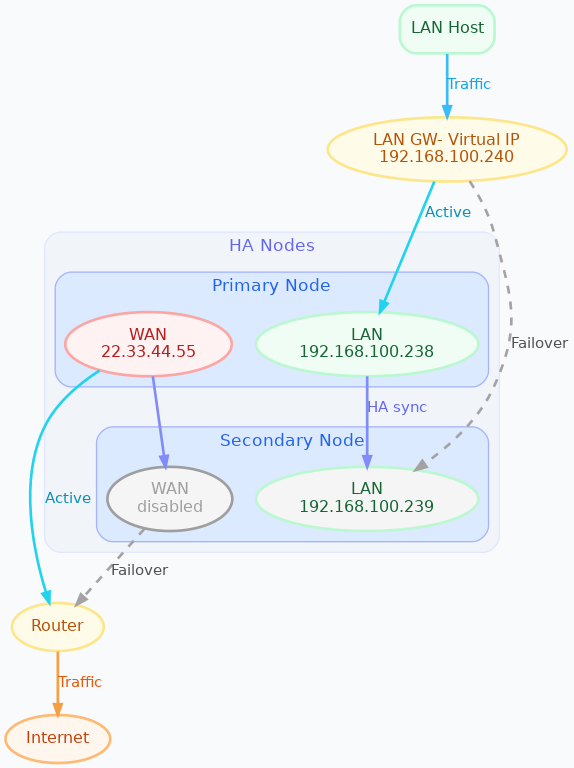
Key concepts
Before setting up HA, make sure these concepts are clear:
- Primary Node: the firewall actively handling traffic and services.
- Secondary (Backup) Node: standby firewall that takes over if the primary fails.
Virtual IP (VIP): shared IP address per interface. Clients must use the VIP as:
- default gateway
- DNS server
- VPN endpoint so that failover is transparent.
HA roles
Master
- The node that has all interfaces active and processes all traffic.
- Under normal conditions, the Primary Node is Master.
Backup
- The node that does not process traffic.
- Under normal conditions, the Secondary Node is Backup.
Important: All configuration changes must be made on the primary node. The secondary should be treated as read-only, except for LAN interface network setup needed by the cluster.
All other settings (firewall rules, VPNs, Threat Shield, etc.) are synchronized automatically from primary to secondary.
How HA works
Heartbeat (VRRP)
- Primary and secondary continuously check each other over VRRP.
- If primary fails, secondary becomes Master and takes over VIPs.
Settings synchronization
- Primary sends configuration securely to the secondary (rsync over SSH).
- Connection state (conntrack) is also synchronized.
Role-based service control
- Backup node keeps services off to avoid conflicts.
- When promoted to Master, it enables all services automatically.
Some changes still require manual HA updates (example: adding/removing LAN interfaces).
Supported features
HA synchronization supports:
- Firewall rules, port forwarding, DHCP, DNS
- VPNs (OpenVPN, IPsec, WireGuard)
- QoS, MultiWAN, DPI rules
- Reverse proxy, ACME certificates
- Static routes
- Threat Shield IP (banip)
- Threat Shield DNS (adblock)
- Users and objects
- Netmap, NAT helpers, DDNS
- Controller connection and subscription (ns-plug)
- Active connections tracking (conntrackd)
- Hotspot (dedalo) only on physical interfaces
WAN / LAN support matrix
WAN interface types supported
- Static IPv4 / IPv6
- DHCP IPv4
- Physical Ethernet
- VLANs (on physical/bond/bridge)
- PPPoE (physical or VLAN)
- Bonds and bridges for WANs
Interface limitations
- Only IPv4 supported on LAN interfaces
- HA interface must be physical
- Bonds/bridges not supported on HA interface
- Hotspot supported only on physical interfaces
General limitations
- Extra packages not in official image are not supported
- rsyslog config is not synced (use controller for remote logs)
- After first sync, secondary gets same hostname as primary
Requirements
Before setup:
- Two identical firewalls (same NIC names/order: eth0, eth1, …)
- Both nodes connected to the same LAN broadcast domain
- Static IPs for all LAN interfaces that will host VIPs
- HA interface must be a physical LAN port on both nodes
Setup process (overview)
- Install same NexappOS/NethSecurity version on both nodes.
- Cable both nodes into the same LAN segments (ideally redundant switches).
- Configure the HA interface on both nodes with static IPs.
- Initialize HA cluster using
ns-ha-config. - Configure WAN(s) on primary only (auto-synced to secondary).
- Verify HA status and sync.
- Add optional extra LAN interfaces to cluster.
- Add optional extra VIPs.
Network cabling
LAN
- Connect both LAN interfaces to the same broadcast domain.
- Prefer redundant switches.
- If switches are linked, they must support STP to avoid loops.
WAN
- Connect both WAN ports to the ISP/router.
- WANs do not trigger failover (to avoid MultiWAN conflicts).
- WAN config is done only on primary.
HA interface configuration
On secondary:
- configure a physical interface with static LAN IP
(example:
192.168.100.239)
- configure a physical interface with static LAN IP
(example:
On primary:
- configure matching interface with static LAN IP
(example:
192.168.100.238)
- configure matching interface with static LAN IP
(example:
These are management IPs used even if HA is disabled.
Cluster initialization
Run on primary node:
Check requirements
ns-ha-config check-primary-node <lan_interface>
ns-ha-config check-backup-node <backup_node_ip> <lan_interface>
Optional password pipe:
echo "<backup_root_password>" | ns-ha-config check-backup-node <backup_node_ip> <lan_interface>
Initialize primary
ns-ha-config init-primary-node <primary_node_ip> <backup_node_ip> <virtual_ip_cidr> <lan_interface>
This configures:
- keepalived + VIP
- conntrackd sync
- rsync over SSH
- dropbear sync daemon on port 65022 (keys only)
Initialize secondary (from primary)
ns-ha-config init-backup-node <lan_interface>
Optional password pipe:
echo "<backup_root_password>" | ns-ha-config init-backup-node <lan_interface>
WAN interfaces
No special HA steps required.
- Configure WAN(s) on primary in Interfaces and devices.
- HA scripts replicate to secondary automatically.
- Secondary keeps WAN down unless it becomes Master.
Verify configuration
ns-ha-config show-config
ns-ha-config status
First sync may take a few minutes. After sync, status should be Up to Date.
Add additional LAN interfaces
Before adding:
- the interface must exist on both nodes
- both nodes must have static IPs set
- device hierarchy must match (same VLAN parents, bonds, etc.)
Command:
ns-ha-config add-lan-interface <primary_ip> <backup_ip> <vip_ip_cidr>
Example:
ns-ha-config add-lan-interface 192.168.200.1 192.168.200.2 192.168.200.253/24
Hotspot in HA
Supported with constraints:
- hotspot must run only on physical interfaces
- secondary must have identical NICs
- MAC address is copied on failover to preserve captive portal behavior
- sessions stored in RAM → users may need re-auth after failover
Extra Virtual IPs
Add VIPs that should fail over:
ns-ha-config add-vip <interface> <vip_ip_cidr>
Remove interfaces / VIPs
Remove interface from HA:
ns-ha-config remove-interface <interface>
Remove VIP:
ns-ha-config remove-vip <interface> <vip_ip_cidr>
Configuration example
Assume:
- Primary LAN IP:
192.168.100.238 - Secondary LAN IP:
192.168.100.239 - LAN VIP:
192.168.100.240/24 - LAN interface name:
lan - Secondary root password:
backup_root_password
Run on primary:
# Check requirements
ns-ha-config check-primary-node lan
echo "backup_root_password" | ns-ha-config check-backup-node 192.168.100.239 lan

# Initialize primary
ns-ha-config init-primary-node 192.168.100.238 192.168.100.239 192.168.100.240/24 lan

# Initialize secondary (run from primary)
echo "backup_root_password" | ns-ha-config init-backup-node lan
If you want, paste the next section you’re working on and I’ll format it the same way (clean page + NexappOS naming).